

#145: Smart Angular apps with Firebase AI Logic
By Aristeidis Bampakos

Meet the expert

Aristeidis Bampakos wrote this issue’s featured article on building smart Angular apps with Firebase AI Logic. He’s a Google Developer Expert (GDE) for Angular with 20+ years in software development. Based in Athens, he leads web development at Plex Earth, specializing in Angular. An award-winning author of Learning Angular and Angular Projects, he’s passionate about growing the developer community through writing, speaking, and teaching.
In this article, we will learn how to build smart and scalable Angular applications using the Firebase services from Google. We will see how to extend Angular applications by adding agentic AI capabilities using the Firebase AI Logic SDK.
The article is greatly inspired by my new book, Angular Projects – 4th edition, which you can also purchase by scanning the QR code below:

Figure 1: Book QR code
Every chapter of the book is a separate real-world Angular project with modern technologies. Each project reflects how real teams work: forms, routing, data, and the small choices that make an application feel finished.
In one of the chapters, you will build CityPass Parking, an AI-enabled parking validator that allows users to submit car tickets and verify the time of their stay in the parking. The main feature of the project is a form to enter ticket details:

Figure 2: Ticket form
The form consists of a date picker component and two input boxes that allow users to enter the required data.
Business Logic in Angular
The business logic layer in an Angular application defines how things are done in the application, and it is typically used for data access and complex tasks, such as:
Accessing data from a REST API over HTTP
Interacting with the local storage of the browser
Performing data transformations and calculations
Developers use Angular services to implement the business logic in an Angular application and make it available to components using the Angular Dependency Injection (DI) mechanism.
A popular best practice in the Angular community is that services should do one thing and do it well. The practice is based on the Single Responsibility Pattern (SRP), and it is described in the official Angular styleguide here. In the CityPass Parking application, we have a single service that creates a new parking ticket:
import { Service } from ‘@angular/core’;
@Service()
export class Tickets {
create(ticket: Ticket) {
}
}
When the business logic layer needs to support more use cases that cross domain boundaries, you must create a new service. We will see an example of this scenario in the following section.
Adding new features
The form of creating new tickets in the CityPass Parking application requires users to enter the location of the parking manually. According to the requirements, we could improve it further by allowing users to select the location from a list. The development team should make the following changes in the application:
Change the UI of the specific component and add a select component for the available locations.
Create a new service to retrieve the locations and populate the select component:
import { Service } from ‘@angular/core’;
@Service()
export class Locations {
getAll() {
}
}
The preceding steps require time and resources from the development team to implement the new feature. We could leverage the power of AI and support the new feature and future changes without ever touching the UI, using prompts.
We have already mentioned that Angular services should follow the one concept per file rule. One exception to this rule is when AI comes into the game because it can understand what it can do and when, with the right prompt. In the following section, we will see how AI can orchestrate the business logic of an Angular application and use prompts with Firebase AI Logic.
Introducing Firebase AI Logic
The Firebase AI Logic is a service of the Firebase product family that enables developers to add agentic AI capabilities in client-side applications:
It supports a variety of programming languages, including JavaScript, which makes it appealing to Angular development.
It supports Gemini models and allows developers to interact with the Gemini products securely. Firebase AI Logic is connected with a Firebase project internally, so that no Gemini API key is required on the client side of the application.
It is the recommended approach when your existing infrastructure is based on Firebase because it integrates seamlessly with other Firebase services.
In the following image, you can see a high-level overview of an AI agent based on the Firebase AI Logic, inside an Angular application:
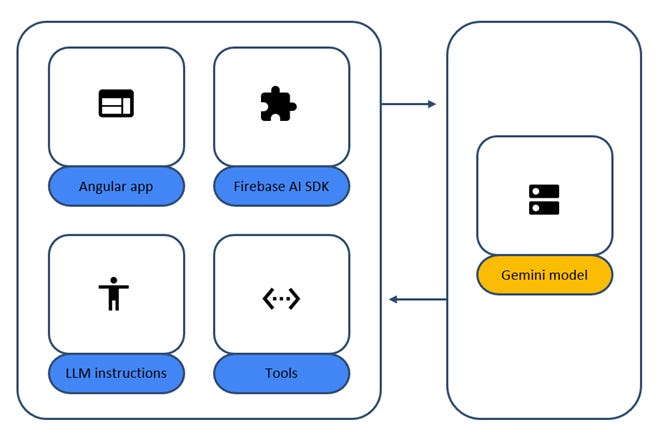
Figure 3: Firebase AI Logic
The yellow box resides on the server side, in Firebase services, and defines the Gemini model that the agent interacts with.
The blue boxes are the Angular application and the AI agent that reside on the client side. The Angular application uses the Firebase AI SDK, which is an npm package that exposes all the required methods for interacting with Firebase AI Logic, to create an agent. The LLM instructions describe the persona of the agent, and the tools define what the agent can do in the Angular application.
Agent tools
In the context of agentic AI, a tool is also known as function calling because it can call existing functions in an application. In the context of Angular, the agent communicates with the existing business logic layer to expose predefined methods as tools:
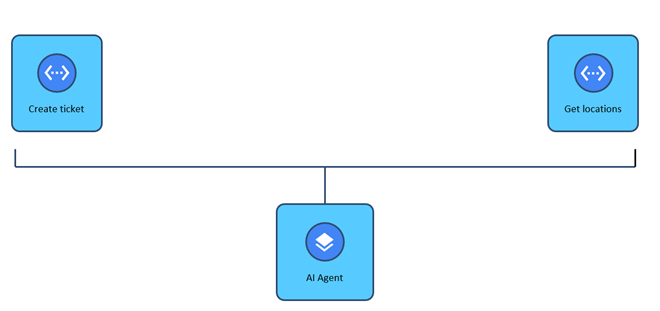
Figure 4: Agent tools
As we see in the previous image, the AI agent of the CityPass Parking application exposes two tools: one for creating tickets and another for retrieving parking locations. The agent is also an Angular service that communicates with the Tickets and the Locations service classes to access their public API:
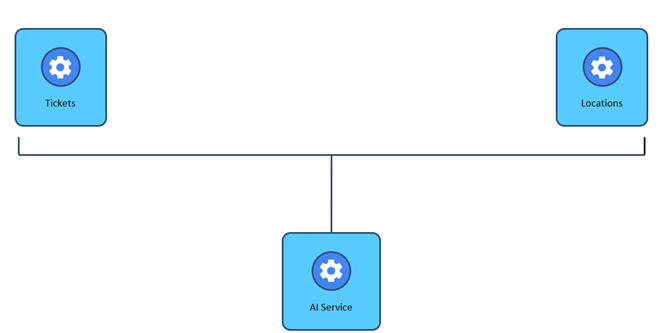
Figure 5: Business logic layer
The tools of the agent are defined in the functionDeclarations property of a FunctionDeclarationsTool object:
const toolset: FunctionDeclarationsTool = {
functionDeclarations: [
{
name: ‘addTicket’,
description: ‘Add one ticket’,
parameters: Schema.object({
properties: {
plateNo: Schema.string(),
arrival: Schema.string(),
location: Schema.string()
}
})
}
]
};
In the above snippet, we define only one tool for creating parking tickets. A tool has the following properties:
name: The name of the tool. Agents respond with a suitable tool name according to the received prompt.
description (optional): A short description.
parameters: The properties needed by the agent to call the particular tool. Firebase AI Logic uses the Zod library to define a typed schema for the call parameters.
The persona of the agent is a simple variable, such as the following:
const instructions = `
Welcome to CityPass.
You are a superstar agent for this car parking validator.
You will assist users by submitting parking tickets.
You can convert date phrases to ISO strings and
act as a geocode service to convert a location or address
to coordinates, long/lat.
`;
According to the previous snippet, the agent can convert dates to ISO strings and placemarks and addresses to coordinates.
We use the getGenerativeModel method from the firebase/ai package to combine the previous information with a Gemini model of our choice:
const ai = getAI(firebaseApp);
const model = getGenerativeModel(ai, {
model: ‘gemini-3-flash’,
systemInstruction: instructions,
tools: [toolset]
});
In the preceding snippet, the ai parameter comes from the configuration of a Firebase application that we have associated with the Firebase AI Logic through the Firebase Console.
The generated model can start listening for prompts using the following snippet:
const chat = model.startChat();
The startChat method initiates a chat session between the agent and any caller. The application forwards prompts to the Gemini model using the snippet below:
let result = await chat.sendMessage(prompt);
When the model returns a response, we can extract the selected tool and call the appropriate method from the service:
const calls = result.response.functionCalls();
if (calls && calls[0].name === ‘addTicket’) {
const args = calls[0].args as Record<string, string>;
this.tickets.create(
args[’plateNo’],
args[’arrival’],
args[’location’]
);
}
The preceding snippet shows the execution of the tool for creating new parking tickets. The development team can now use the same agent to create a new tool for the retrieval of the available parking locations and expose it to the rest of the application. They will not need to modify the UI because users will be able to describe the new requirements with a prompt.
Security considerations
The Firebase AI Logic is a secure solution for adding agentic capabilities in a client-side application, as all interactions with the AI model go through Firebase services. Additionally, we can enhance the existing security measures with Firebase Server Templates. Firebase Server Templates move part of the agent to the server side, along with the Gemini models, and define them in a template:
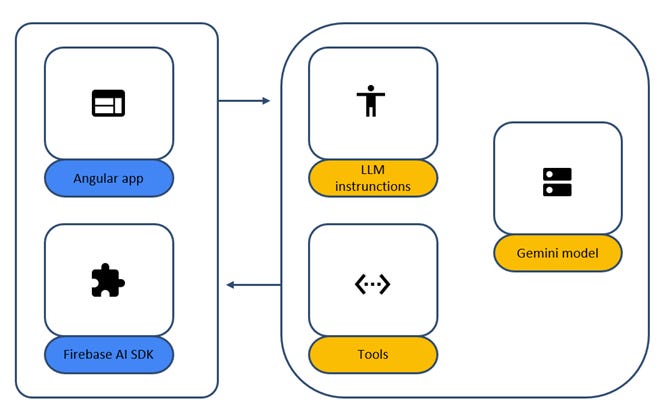
Figure 6: Firebase Server Templates
As shown in the previous image, the persona and the tool definition have been moved to the Firebase services. The described method has the following advantages:
Prevents prompt injection.
Faster development iteration. Any change in the tool or the agent requires modifying the template.
Instant addition of new features. The server maintains multiple templates, and the application can switch to them using an ID.
Firebase Server templates are a new feature in the Firebase AI Logic service that ensures security is at the forefront of any AI interaction.
Conclusions
The Firebase AI Logic is a secure and quick way to add agentic AI capabilities to an Angular application. The versatility of Firebase Server Templates makes it even more secure as it moves critical parts of the AI agent to the server. However, keep in mind that not everything in an application should be a prompt. Make a prompt for:
Common tasks: Everyday tasks that your users do.
Easy tasks: Small tasks that need a small amount of information.
New features: Introduce AI gradually in your application.
If you have the previous best practices in mind while designing AI experiences, you will build applications that your users will love to use!
This Week in the News
🤖 Flue 1.0 Beta: Cloudflare’s Answer to the Agent Framework Wars: Not to be outdone by Vercel, Fred K. Schott and the Cloudflare crew dropped a beta for Flue, an open TypeScript-first agent framework with a hard stance against vendor lock-in. The headline addition is a clean split between autonomous Agents for open-ended tasks and deterministic Workflows for when you want exact control. Channels let you drop agents directly into Slack, GitHub, Linear, and more, and a durable event log means a crashed process picks right back up where it left off.
🔷 TypeScript 7.0 RC is Here, and It’s Written in Go: The TypeScript team has ported the entire codebase from TypeScript over to Go, and with native code speed and shared memory parallelism, TypeScript 7.0 is often about 10 times faster than TypeScript 6.0. The RC is available now via npm install -D typescript@rc. The catch: this version locks in 6.0’s stricter defaults as hard errors, so strict is on by default, target: es5 is gone, and moduleResolution: node is out the door. Worth reading the migration notes before you upgrade anything in prod.
🧪 SvelteKit 3.0, Vue 3.6, Vite 8.1, and Astro 7.0 are all in beta
A busy pre-release season for the JS ecosystem, four major framework updates are racing toward stable at once. If you’ve been waiting to see where the frontend tooling landscape lands before committing to a stack decision, now’s a good time to start poking at the betas.
⚙️ WASI 0.3 is officially here and async is now native to WebAssembly
The WASI Subgroup voted to ratify WASI 0.3.0, rebasing WASI onto the WebAssembly Component Model’s async primitives. The big win: the host is now the one in charge of managing the one event loop shared by all components, which means components can finally be composed with each other without their event loops stepping on each other’s toes. For most microservices, this will reduce the time for calling other microservices from milliseconds to nanoseconds.
🧠 2-Day Claude AI Mastery Workshop: Live This Weekend
Claude has been shipping fast: Skills, Connectors, Cowork, vibe coding, and most people are still catching up. This weekend’s live workshop condenses 800+ hours of research and real-world practice into 16 focused hours covering Claude’s three modes, automation with Skills and Connectors, and 10+ AI tools and workflows. Saturday & Sunday, 10 AM – 7 PM EST. Register here.
Beyond the Headlines
💸 Never Waste a Token
Sunil Pai digs into a problem that’s easy to miss until it shows up in your billing dashboard: when your process dies mid-inference, you don’t just lose your place, you lose money. The fix is a durable buffer sitting between your agent and the LLM provider, so a mid-stream deploy or crash doesn’t force a full retry. Resumable streaming and crash recovery turn out to be one mechanism, the same durable chunk log; the only question is whether a live producer is still attached.
🌐 How Building an HTML-First Site Doubled Users Overnight
A real-world case study where ditching the React SPA in favour of server-rendered, progressively enhanced HTML wasn’t just a philosophical choice, it was the one that worked. When the site launched, the number of people completing the form doubled. The analytics team didn’t even know where these users were coming from, your JavaScript-based analytics package doesn’t see the users you’re bouncing because of JavaScript failures.
👁️ Smart Ignore Regions: Visual Testing That Learns Without Looking Away
The classic pain of visual regression testing: dynamic content like timestamps and footer copy triggers false positives on every build, so you draw a box around it and move on, except now you’ve created a blind spot. Vizzly’s smart ignore regions use Honeydiff’s change metadata to find recurring dynamic areas, ask you to confirm whether the change is expected, and use that decision on future reviews without turning the whole area into a blind spot. In their own dogfooding, confirming one footer region took 41 changed screenshots out of the review queue without changing the test suite.
🤖 Building a WASM-Powered Scanner Driver in the Browser
A fun one: a dev resurrected an old USB scanner with no modern driver support by running a WASM-powered emulator in the browser, bridged to the physical hardware via WebUSB. Niche, sure, but it’s a great illustration of how far browser APIs have come when you actually push them.
🎨 Orbit: Polar’s LLM-Safe Design System
The problem isn’t that LLMs can’t write CSS or Tailwind, they write it fluently. The problem is that they write it without being aware of the underlying decisions. Polar’s new Orbit system bets on making off-brand choices structurally impossible: if a value isn’t a design decision they’ve actually made, it should not pass CI. Intent-named tokens, typed props over raw class strings, and ESLint rules that enforce it all.
Developer Toolbox
🎲 PolyCSS
PolyCSS renders solid and textured 3D meshes in the DOM without WebGL — each polygon is a real element you can style, click, and inspect. It supports OBJ, glTF, GLB, and MagicaVoxel VOX files and works with vanilla JS, React, and Vue. Mostly a curiosity, but the kind that makes you want to open the builder just to see how far you can push it.
That’s all for this week. Have any ideas you want to see in the next article? Hit Reply!
Cheers!
Editor-in-chief,
Kinnari Chohan
👋 Advertise with us
Interested in sponsoring this newsletter and reaching a highly engaged audience of tech professionals? Simply reply to this email, and our team will get in touch with the next steps.