

#147: Your Next Feature Request Might Already Be a Working Prototype
And what to check before you build on top of an AI-generated prototype

AI can write your code in seconds. But should it?
We just launched Build with AI, and our new series, The Agentic Engineering Playbook, is already asking the hard questions.
Two parts are live already:
Why vibe coding feels magical for prototypes, but breaks down at scale
The four eras of agentic engineering, and where most teams actually stand today

Three more parts are coming, unpacking how to turn AI from a fast code generator into a real engineering multiplier.
Subscribe today to follow the complete series as new parts are released and claim your free welcome eBook.
For years, the relationship between design and development followed a predictable rhythm. Designers explored ideas, tested them in static mockups, and eventually handed off a set of screens, specs, and good intentions. Developers took it from there, filling in the gaps that design never quite covers: edge cases, data structures, error states, the messy reality of production systems. It worked, mostly, because everyone understood their role in the relay.
That rhythm is breaking down, and it’s worth understanding why, because the shift changes what actually lands on your desk before you write a line of code.
Before we get to that, here’s a look at what’s making news this week:
Claude Sonnet 5 is here, though lifted export controls on Fable 5 are stealing its thunder
Vercel Functions now support Docker, so you can deploy containers directly
How TypeScript 7’s Go-based compiler made VS Code over 10x faster to build
Oxlint, a Rust-based linter that turns 30-second ESLint runs into sub-second ones
Prototypes That Behave Like Real Products
A new generation of AI-assisted tools, including Lovable, v0.dev, Bolt.new, Figma Make, and Replit, lets designers build interactive prototypes that don’t just look like an app but function like one. Screens respond to input, flows execute end to end, and users can complete real tasks inside something that was assembled from a natural language description rather than a stack of tickets. What used to take a sprint or two of coordinated effort between design, product, and engineering can now happen in an afternoon, in the hands of a single person who understands the problem well enough to describe it clearly.
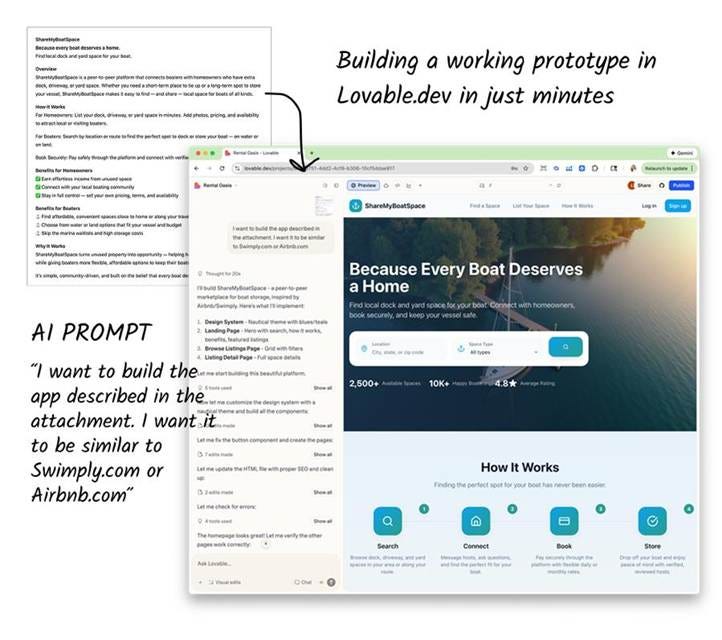
Fig. 1: I want to build the app described in the attachment” — a plain-language prompt turns a one-page brief into a working homepage, complete with a nav, hero section, and live stats.
This is not a gimmick. Designers are using these tools to validate ideas with real users before a single developer gets involved, testing whether a value proposition resonates and whether a flow makes sense long before anyone commits to an architecture. That’s a genuinely good thing. Cheaper validation means fewer wasted sprints building something nobody wanted, and it means the thing that eventually reaches you has already survived contact with actual users.
The complication is what happens next. In some organizations, that validated prototype isn’t just inspiration for a spec anymore. It’s the artifact itself, checked into a repository and treated as a starting point for the real build. Some designers are going further still, using tools like Claude Code directly inside an editor to scaffold application structure, generate front-end and back-end code, and wire up basic services, all before a developer is looped in at all.
The Gap Between “It Works” and “It’s Ready”
If you’re a developer, you’ve probably already brushed up against this without naming it. Maybe a product manager forwarded you a Lovable prototype and asked how long it would take to “make it real.” Maybe a designer handed you a working demo built with v0 and seemed genuinely confused when you explained that “working” and “production-ready” are not the same claim.
They’re not being naive. The prototype really does work, in the sense that matters to a designer validating an idea: it demonstrates behavior, and it lets users complete tasks. But there’s a meaningful gap between a prototype that demonstrates an idea and a system that can hold up in production, and closing that gap is still, unmistakably engineering work.
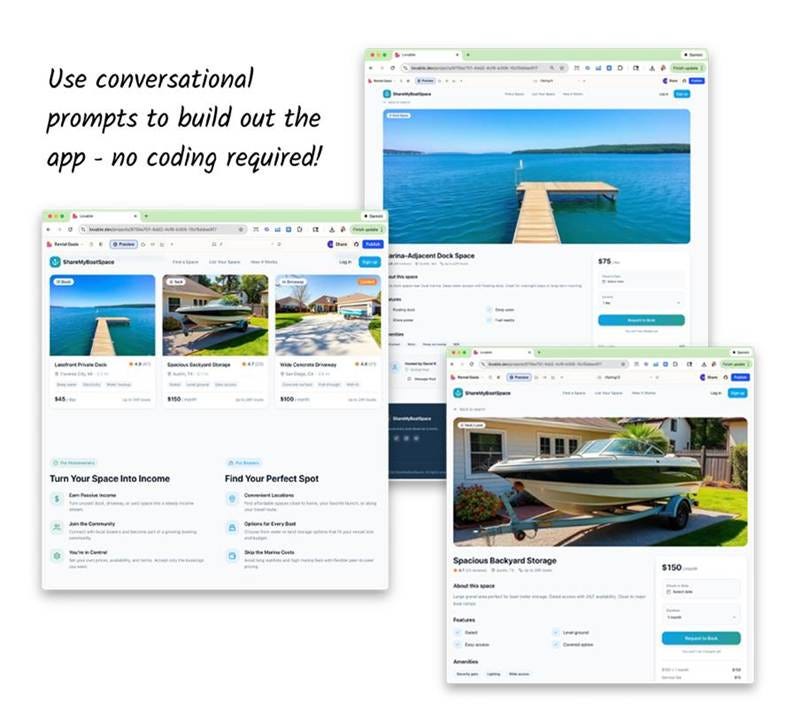
Fig. 2: Listings, pricing, and booking flows, fully styled and clickable. Convincing enough to hand to a real user for testing, though nothing behind these screens has been built yet.
A few things tend to be true of AI-scaffolded prototypes, regardless of which tool generated them. Authentication is often stubbed out or handled in a way that would never survive a security review. Data validation is inconsistent because the AI is optimized for showing behavior rather than defending against malformed input. Error handling covers the happy path and little else.
Accessibility is frequently an afterthought, since the tools were optimized to produce something visually convincing and functionally demonstrable, not something that passes a screen reader test. And the underlying architecture, however clean it looks, was generated to satisfy a prompt, not to scale, so assumptions about data models or service boundaries may not hold once real usage patterns show up.
None of this means the prototype is worthless. It means your job now includes a step that used to be implicit: figuring out exactly what you actually inherited before you start building on top of it.
Treat It Like a Pull Request From Someone You’ve Never Met
The most useful mental model here is one you already have. When you review a pull request from a junior developer, you don’t assume the code is correct just because it runs. You ask what it’s actually doing, what assumptions it’s making, and where it’s likely to break under conditions the author didn’t consider. AI-generated scaffolding deserves exactly that same posture, whether it arrived as a Lovable export, a v0 component, or a Claude Code session someone ran before you were in the room.
That means asking pointed questions early, ideally before you commit to building on top of what you were handed. What’s actually persisted versus what’s mocked in the local state? What happens when a request fails, or when a user submits something malformed? What was tested with real users, and what was simply assumed to work because it was demonstrated correctly in a single session? Is there an authentication layer here, or does it just look like one? These aren’t gotcha questions aimed at the designer who built the prototype. They’re the same questions you’d ask of any unfamiliar codebase, and asking them early saves you from discovering the answers the hard way three sprints later.
It also helps to have this conversation with designers directly, rather than assuming they know where the line sits. Most designers using these tools are not trying to skip engineering. They’re solving a real problem: getting to validated learning faster, with fewer people and less overhead. They generally want to know where their prototype’s assumptions will cause you trouble, because a designer who understands that gap can scope their next round of prototyping more usefully, and can stop treating “it works in the demo” as equivalent to “it’s ready to ship.”
The Engineering Value Is Shifting, Not Shrinking
There’s a temptation to read all of this as a threat, as though AI-assisted prototyping is quietly encroaching on territory that used to belong to developers. That framing misses what’s actually happening. The work that’s disappearing is the work of translating vague requirements into a first functional version, the scaffolding and boilerplate that ate weeks of calendar time without much intellectual weight to it. What’s left, and arguably what was always the hard part, is exactly the stuff AI tools are bad at: reasoning about scale, securing a system against real-world abuse, designing data models that won’t need to be rebuilt in six months, making something usable for people with disabilities, and maintaining a codebase over years rather than a demo over an afternoon.
That’s not a smaller job. It’s a more concentrated one. The parts of development that require judgment, not just output, are becoming a larger share of what you actually spend your time on, because the parts that didn’t require judgment are increasingly handled before you arrive.
This also changes what’s worth getting sharper at. Being able to read an unfamiliar, AI-generated codebase quickly and spot where it’s fragile is now a core skill, not a nice-to-have. So is being explicit and precise when you push back on scope or timeline, because “the prototype already works” is going to be a recurring argument you’ll need to answer with specifics rather than vague discomfort. Security and accessibility reviews stop being a checklist you run near the end of a project and start being something you do as a first pass on anything that arrives from a design tool, since those are exactly the areas most likely to have been skipped.
The Same Tools Are Yours to Use, Too
It’s worth remembering that Claude Code, and tools like it weren’t built exclusively for designers making the leap into software. They’re development tools first, and the same techniques designers are using to scaffold a prototype quickly are just as available to you when you’re standing up a new service, exploring an unfamiliar API, or getting a rough version of a feature in front of a stakeholder before committing to a final approach.
The habits that make these tools useful are the same ones described in every good code review or design brief: be specific about what you want, provide the context that actually matters, and treat the first response as a starting point rather than a finished answer. Vague prompts produce the same vague, generic output whether you’re a designer exploring a persona or a developer scaffolding an endpoint. The developers getting the most out of AI coding assistants tend to work the same way experienced designers do: iteratively, asking the tool to explain its reasoning, comparing alternatives, and pushing back when something feels underspecified rather than accepting the first plausible-looking result.
This matters because the line between “AI helped a designer build something” and “AI helped a developer build something” is thinner than it looks. The tools are converging. What still differs is the judgment applied to the output. A designer evaluating an AI-generated flow is asking whether it serves the user. A developer evaluating AI-generated code is asking whether it will hold up under load, survive an audit, and still make sense to the next person who opens the file. Treating AI as a fast, occasionally overconfident collaborator, rather than either a threat or an oracle, is probably the single most transferable skill in all of this.
A Few Things Worth Carrying Forward
The shift toward AI-assisted prototyping isn’t going to reverse, and treating it as a fad to wait out is the wrong instinct. A more useful posture is to get specific about where the value of your engineering judgment actually sits, and to make that value visible earlier in the process rather than discovering it under deadline pressure.
A few concrete habits are worth building now. Ask what’s real and what’s demonstration-grade the moment a prototype lands on your desk, before you start estimating work against it. Run a quick security and accessibility pass on any AI-generated scaffold as a default step, not an optional one, since those are the areas most consistently under-covered. Talk to whoever built the prototype about what they validated with users and what they simply assumed, because that conversation will tell you more about risk than reading the code alone. And resist the urge to either dismiss these tools as toys or treat their output as trustworthy by default. Both instincts will cost you time.
The gap between an idea that works and a system that lasts hasn’t closed. It’s just moved earlier in the process, and it’s now more clearly yours to own.
This article draws on ideas and case study material from AI in UX Design: How UX Designers are Using AI in the Age of Artificial Intelligence by Lise Pilot. If you want the fuller picture of how designers are using these same tools across the whole product lifecycle, from research and personas through no-code prototyping and validation, you can find the book here.
This Week in the News
🧠 Claude Sonnet 5 arrives to a distracted crowd
Anthropic shipped Claude Sonnet 5, its latest mid-tier workhorse. Solid release, unfortunate timing: with export controls on Fable 5 now lifted, most devs are eyeing the bigger sibling instead.
🔒 GitHub lets you lock down issue creation
GitHub’s latest move to keep project management sane in the agentic era: you can now restrict issue creation to collaborators with write access. Fewer drive-by tickets, cleaner backlogs.
🎨 Meta open-sources Astryx, a design system built for agents
Meta released Astryx, an open-source design system built to play nicely with AI agents. It is reportedly battle-tested across 13,000 internal apps, so it arrives with more mileage than most v1 releases.
🐳 Vercel Functions now speak Docker
Bring your Dockerfile to Vercel Functions and deploy containers directly. A genuinely useful addition, even if longtime users will note it took only 6.5 years to reinvent ZEIT.
Beyond the Headlines
⚡ How TypeScript 7 made VS Code faster to build
The VS Code team adopted TypeScript 7, the Go-based compiler rewrite that is over 10x faster in many cases. They started migrating while TS 7 was still under construction, and both teams came out ahead: faster builds for VS Code, a better-tested release for TypeScript.
💾 Meta’s AI storage blueprint at scale
If AI is the brain, storage is the memory. Meta’s infra team breaks down how they keep exabytes of training data fast and reliable as frontier model releases shrink from months apart to weeks.
🌗 Dark mode with web standards
Ollie Williams shows how to build a proper dark mode toggle with a meta tag, the color-scheme property, and barely any JavaScript. Includes the gotchas, like why prefers-color-scheme ignores your in-page toggle.
📺 The business of TanStack
CodeTV’s Build Log follows Tanner Linsley, who built TanStack into a thriving open source community and now faces the harder problem: turning it into a sustainable business.
Developer Toolbox
🦀Oxlint: A Rust-based linter for JS/TS from VoidZero (Evan You’s tooling company) that turns 30-second ESLint runs into sub-second ones. As of March, its plugin system runs most existing ESLint plugins as-is, so the “but my custom rules” objection is mostly gone. No migration needed either: npm install -D oxlint, let it handle the fast first pass, and keep ESLint for the gaps. Preact, PostHog, and Midjourney already run it.
That’s all for this week. Have any ideas you want to see in the next article? Hit Reply!
Cheers!
Editor-in-chief,
Kinnari Chohan
👋 Advertise with us
Interested in sponsoring this newsletter and reaching a highly engaged audience of tech professionals? Simply reply to this email, and our team will get in touch with the next steps.