

#148: Good Prompting Isn't the Hard Part Anymore
And why "be specific" means something different when the output has to ship code

For years, casual AI users and professional developers were learning what looked like the same skill from opposite ends. Someone drafting emails in ChatGPT and someone drafting a component in an AI coding assistant were both told the same core lesson: be specific, and the output gets better. Because the mechanic looks identical from a distance, it was easy to assume the habit transfers cleanly, that developers simply apply the same technique to a more technical domain.
That assumption falls apart under scrutiny, and the reason is worth spelling out, because it changes what “good prompting” actually requires the moment your output has to run in production instead of sit in an inbox.
Before we get to that, here’s a look at what’s making news this week:
The Same Advice, Written for Different Stakes
Sebastian Huelswitt’s AI for Anyone: The Beginner’s Guide to AI is a fair representative of the genre this assumption comes from. It’s built for someone who has never opened ChatGPT and just wants to stop feeling behind — pick a tool, write a first prompt, learn to ask more clearly, use the output for everyday things like emails or generated images. As a genre, these guides have gotten genuinely good at teaching the one mechanic that matters most to their audience: a specific prompt beats a vague one. That advice isn’t wrong. It’s calibrated for a world where a mediocre first draft costs you a few minutes of editing, not a production incident.
What Specificity Means When the Output Is Code
For a developer, “specific” stops meaning “clear about tone and topic” and starts meaning something much narrower and more technical: which framework and version, which components already exist and shouldn’t be reinvented, which validation approach the rest of the codebase already uses, what the accessibility bar is, where the edges of scope sit. Leave any of that out and you get something that runs but doesn’t belong: a form that duplicates three components you already have, ignores your linting rules, or quietly pulls in a dependency nobody approved.
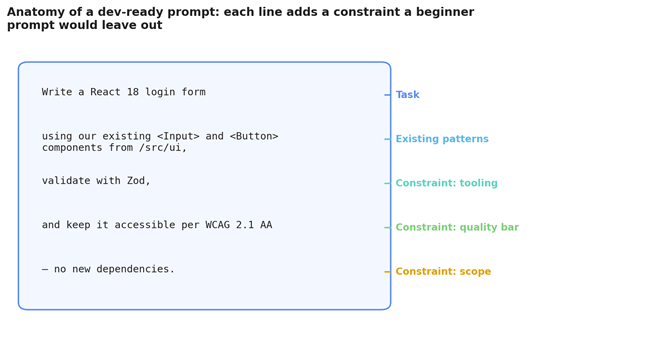
Fig. 1 — Two prompts asking for the same login form. One is general enough for a beginner’s guide. The other names a framework, an existing component library, a validation approach, and an accessibility requirement — the difference between an answer and something you can actually merge.
None of this is exotic information. It’s the same context you’d put in a ticket or hand to a contractor on their first day. The skill was never a secret syntax. It’s the discipline of writing down context a beginner prompt is allowed to skip.
The Distance Between Confidence and Correctness
You’ve likely run into this without naming it. The output looks put-together. It compiles. It might even pass a quick manual check. Then a reviewer, a linter, a security scan, or a real user on a screen reader finds the thing it was never asked to handle.
That’s the actual gap between a beginner’s use case and a developer’s. A blog post that’s slightly off in tone is a two-minute fix. A data-fetching function that’s slightly off in its error handling is an incident with your name near it. The loop looks the same from a distance (prompt, review, adjust), but what “review” has to catch is nowhere close to equivalent: injection risks, auth that looks handled but isn’t, a query that’s fine in a demo and falls over under real traffic, accessibility that was never part of the request because the tool had no way of knowing it mattered.
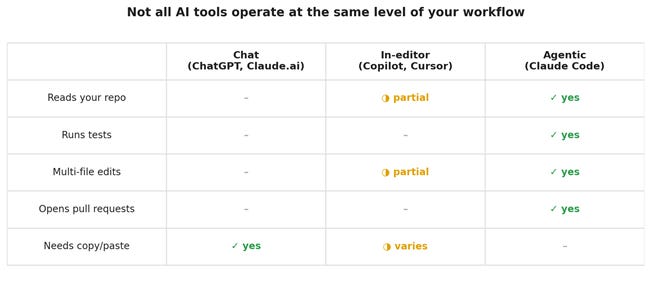
Fig. 2 — Not every AI tool sits at the same distance from your codebase. A chat window only knows what you paste into it. An in-editor assistant sees the file you’re in. An agentic tool can read the whole repo, run the tests, and open the pull request itself — which changes what “writing a prompt” even means.
This is where the tooling itself matters more than a general guide has any reason to mention. A plain chat interface works fine for a one-off question, but everything has to be fed in and pulled back out by hand, and the model never actually sees your repository. In-editor assistants close part of that gap, seeing the file in front of you, usually one at a time. Agentic tools go further still — something like Claude Code can read across the codebase, run your test suite, coordinate changes across several files, and open a pull request for you to look at. That’s not a faster version of the same tool. It’s a different kind of collaborator, and it turns the prompt from a single message into something closer to a scoped handoff.
Reading Generated Code the Way You Would Read a Stranger’s
The useful mental model isn’t new. You already have it. When a pull request lands from someone you’ve never worked with, you don’t assume it’s correct because it runs. You ask what it’s actually doing, what it’s assuming about the data, and where it’s likely to break under conditions the author never considered. AI-generated code deserves exactly that posture, whether it came from a single chat prompt or a longer agentic session that ran while you were somewhere else.
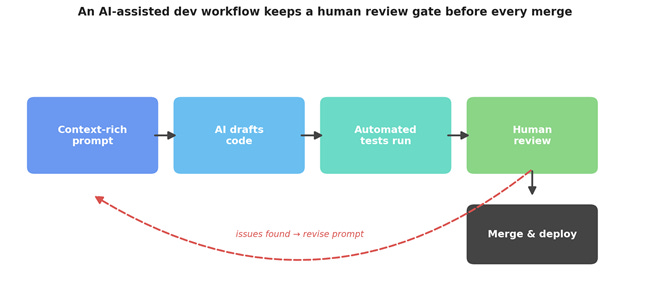
Fig. 3 — The loop that holds up in practice: a prompt written with real context, a draft, automated tests, and a human review gate before anything reaches main. When review turns something up, the fix is usually to revise the prompt itself, not just patch the code, so the next draft doesn’t repeat the mistake.
What matters is that review happens before the merge, not after something surfaces in production, and that automated tests are a first pass rather than a replacement for a person reading the code. Tests catch regressions. They don’t catch a solution that technically passes while solving the wrong problem, and they don’t catch a gap nobody thought to write a test for. The half of this loop that’s easy to skip is also the part that compounds: when review finds a problem, the fix that actually helps next time is updating what the prompt included, not just cleaning up the output by hand. For a general audience there usually isn’t a next prompt to improve. There’s just the next email.
A Discipline That Holds at Every Scale
Worth remembering: tools like Claude Code weren’t built only for the moments things go smoothly. The habits that make an AI assistant useful for a quick script are the same ones that keep you out of trouble on something that’s actually going to ship. Be specific about the constraints that matter, give it the context a stranger would need, treat the first response as a draft rather than an answer. A vague prompt produces the same generically plausible output whether you’re asking for a marketing email or an API endpoint. The general advice isn’t wrong about that. It just never has to deal with what happens when you skip it.
What differs is the judgment applied afterward. Someone using AI to draft an email is checking whether it sounds right. A developer reviewing AI-generated code is checking whether it holds up under load, survives an audit, and still makes sense to whoever opens the file next. Treating AI as a fast, occasionally overconfident collaborator rather than a threat or an oracle is probably the one habit from the casual world that genuinely holds up, once it’s scaled to match the stakes.
What Actually Carries Over and What You’ll Have to Add
Write prompts the way you’d write a ticket, with the framework, the existing patterns, and the constraints spelled out instead of assumed. Match the tool to the size of the job, and reach for something that can actually see your repo once a task crosses more than one file. Keep the review gate in place no matter how confident the output looks. Confidence in tone was never a reliable stand-in for correctness in logic. And when review turns something up, spend a minute updating the prompt or the shared context behind it, not just the code. That’s the step a general audience never needed, and the one that actually compounds.
The gap between a prompt that works and code that belongs hasn’t closed. It’s just moved earlier, into the way the request gets written in the first place, and it’s now more clearly yours to own.
This article draws on ideas and framing from AI for Anyone: The Beginner’s Guide to AI by Sebastian Huelswitt. If you want the gentler, fuller on-ramp — picking your first AI tool, writing a first prompt, and using AI for everyday tasks like emails and image generation — you can find the book here.
This Week in the News
🚀 TypeScript 7 Just Made Your Compiler 10x Faster: Microsoft’s Go rewrite of TypeScript is finally stable, and the numbers are wild. VS Code’s codebase compiles in 10.6 seconds instead of 125, Slack cut CI type-checking from 7.5 minutes to 1.25, and memory usage actually dropped. One catch worth knowing: there’s no programmatic API yet, so Vue, Svelte, and Astro projects are stuck on 6.0 until 7.1 lands. For everyone else, this is the easiest upgrade decision of the year.
🦀 Bun Rewrote Its Entire Codebase in Rust Using 64 Claudes in 11 Days: Jarred Sumner ported all 535,000 lines of Bun from Zig to Rust in 11 days using around 64 parallel Claude agents, with adversarial reviewer agents checking every line. The payoff: 128 bugs fixed, 20% smaller binaries, and the full test suite passing with nothing skipped. Bun is Anthropic-owned now, so grain of salt, but the workflow breakdown is genuinely worth reading.
⚡ Vite+ Goes Beta: VoidZero’s unified toolchain hit beta, bundling Vite, Vitest, Rolldown, Oxlint, and friends behind a single vp command that handles dev, test, lint, build, and monorepo task-running. With 1,300+ public repos already depending on it, “unified toolchain” is starting to look less like a pitch and more like a fact. If your package.json scripts section reads like a ransom note, this is your intervention.
🗺️ react-google-maps: Google Maps, But Make It React: The vis.gl team maintains this library of React components and hooks that wrap the Google Maps JavaScript API, letting you treat a map as a fully controlled reactive component. It also plays nicely with deck.gl for WebGL visualizations on top. Blessed are the maintainers who save us from wrapping imperative APIs in useEffect ourselves.
🎨 env.style: Never Ship to Prod by Accident Again: Ryan George whipped up a project called env.style to change your project’s favicon color based on what environment it’s in, so your dev, staging, and production tabs are visually distinct at a glance. Honestly useful. But if you need this, it’s probably also time to close a few tabs.
🛡️ OSV.dev: Google’s Open Source Vulnerability Database: Google built a distributed, open database of vulnerabilities in open-source software, with precise version-level affected ranges and an API you can query straight from your dependency tooling. Genuinely great infrastructure for the whole ecosystem. I hope whoever built this impressed the committee and got their promotion before the project gets sent to the Google graveyard.
🧭 Safari Ships an MCP Server: Safari Technology Preview 247 includes an MCP server that lets any compatible coding agent drive a real Safari window: reading the DOM, watching network requests, taking screenshots, and checking console output to debug your site autonomously. Apple showing up to the agentic party with a local-first, no-network-calls design is a pleasant surprise. Your “works in Chrome” excuses just lost their last line of defense.
Beyond the Headlines
🧙 Working With AI: A Concrete Example: Carson Gross (of htmx fame) walks through a real hyperscript parser bug where Claude nailed the root-cause investigation and tests but kept proposing hacky fixes until a human who knew the codebase stepped in. The most honest write-up of AI-assisted maintenance I’ve read in a while: be the sorcerer, not the apprentice.
🔁 Harness Engineering for Self-Improvement: Lilian Weng surveys the research on harnesses, the orchestration layer around models that manages workflows, memory, subagents, and self-improvement loops, from context engineering through evolutionary search over harness code itself. Dense, rigorous, and exactly the kind of post you bookmark and actually finish. Clear your calendar for this one.
🏗️ Apps After Agents: Kyle Mathews argues “software is dead” is wrong on both supply and demand: agents can’t absorb judgment-heavy “camera mode” work, and users prefer designed interfaces over formulating prompts. The real moat, he says, is your “substrate” of accumulated decisions and conventions. A genuinely useful frame for anyone tired of both the doomers and the maximalists.
💻 Learning to Code Is Still Worthwhile: Val Town founder Steve Krouse pushes back on the “nobody says learn to code anymore” narrative, arguing coding is worth learning the way math or literature is: for the meta-skills, the creative expression, and the joy. Short, sincere, and a nice palate cleanser after all the AI discourse above.
🎤24 Tips for Giving S-Tier Demos: PostHog’s Jina Yoon watched 50+ hackathon demos back to back and distilled what separated the great from the forgettable: one main point, get to it fast, demo against the painful alternative, and never apologize before you start. Required reading before your next sprint review. Tip 12 alone is worth the click.
Developer Toolbox
🌱 Wordgard: A schema-based, semantic rich-text editor library for the browser from Marijn Haverbeke, where you define exactly what content your documents allow instead of wrestling free-form HTML. Accessible, RTL-aware, collaborative-editing ready, and MIT licensed. The footer proudly declares “Contains 0% AI”, which in 2026 is practically a feature flag.
That’s all for this week. Have any ideas you want to see in the next article? Hit Reply!
Cheers!
Editor-in-chief,
Kinnari Chohan
👋 Advertise with us
Interested in sponsoring this newsletter and reaching a highly engaged audience of tech professionals? Simply reply to this email, and our team will get in touch with the next steps.