

#151: Designing AI Apps Around Two Planes: Control and Data
What restaurant kitchens can teach us about building AI systems that don't break


Meet the expert: Haimantika Mitra

Haimantika Mitra wrote this issue’s featured article on Designing AI Apps Around Two Planes: Control and Data. She is a Senior Developer Advocate by profession, working in core AI and infra and is also currently doing her master’s in AI from Georgia Institute of Technology, Atlanta. She has written an ebook on How to DevRel for Startups and has been writing a number of other technical articles on core AI, GPU, and also developer experience.
If you have shipped an AI feature, you have probably run into this already. You want to reword a prompt, but since the prompt lives inside your application code, changing it means a pull request, a review, and a full deploy. A wording tweak now moves at the speed of your whole release pipeline.
This is common enough that it has become its own genre of blog post. “Why your prompts don’t belong in Git.” “Prompt templates as configs, not code.” The advice is consistent: pull the prompt out of the codebase so you can change it without redeploying, and teams back this up in practice by fetching prompts from a registry at runtime instead of hard-coding them.
This is one example of a much larger idea, and once you see the larger idea, a lot of AI design decisions get easier to reason about.
The larger idea is separating the control plane from the data plane.
In this issue, we will look at why the usual “one big blob” design gets painful, what the two planes actually are, and how to decide what belongs where. We will also look at a recent research paper that pushes the idea further than most teams do.
But before we get into it, here’s a glimpse of what awaits you further in the issue:
First, let’s define what it means
The words “control plane” and “data plane” come from networking. Let’s understand this with the help of a kitchen:
Think of a restaurant. There is a head chef who decides the menu, writes the recipes, and says which dishes are allowed tonight. Then there are the line cooks who take an order and actually cook the food, fast, the same way every time. The head chef is the control plane who makes decisions. The line cooks are the data plane. They do the work, and the food (your data) passes through their hands.
The head chef does not need to touch every plate to do her job. And the line cooks do not need to re-invent the recipe for every order. The kitchen works because those two jobs are separate.
Now map that back to an AI app.
Control plane = the decisions. Which model to use, what the prompt is, which tools the agent may call, what the guardrails are, and how you measure if a change was good (your evals).
Data plane = the work. The actual inference call, the retrieval, the token streaming, the request and response that carry real user data.
The “one big blob” problem
When you ship your first AI feature, mixing the two feels natural. It is all just one function. Here is roughly what that looks like:
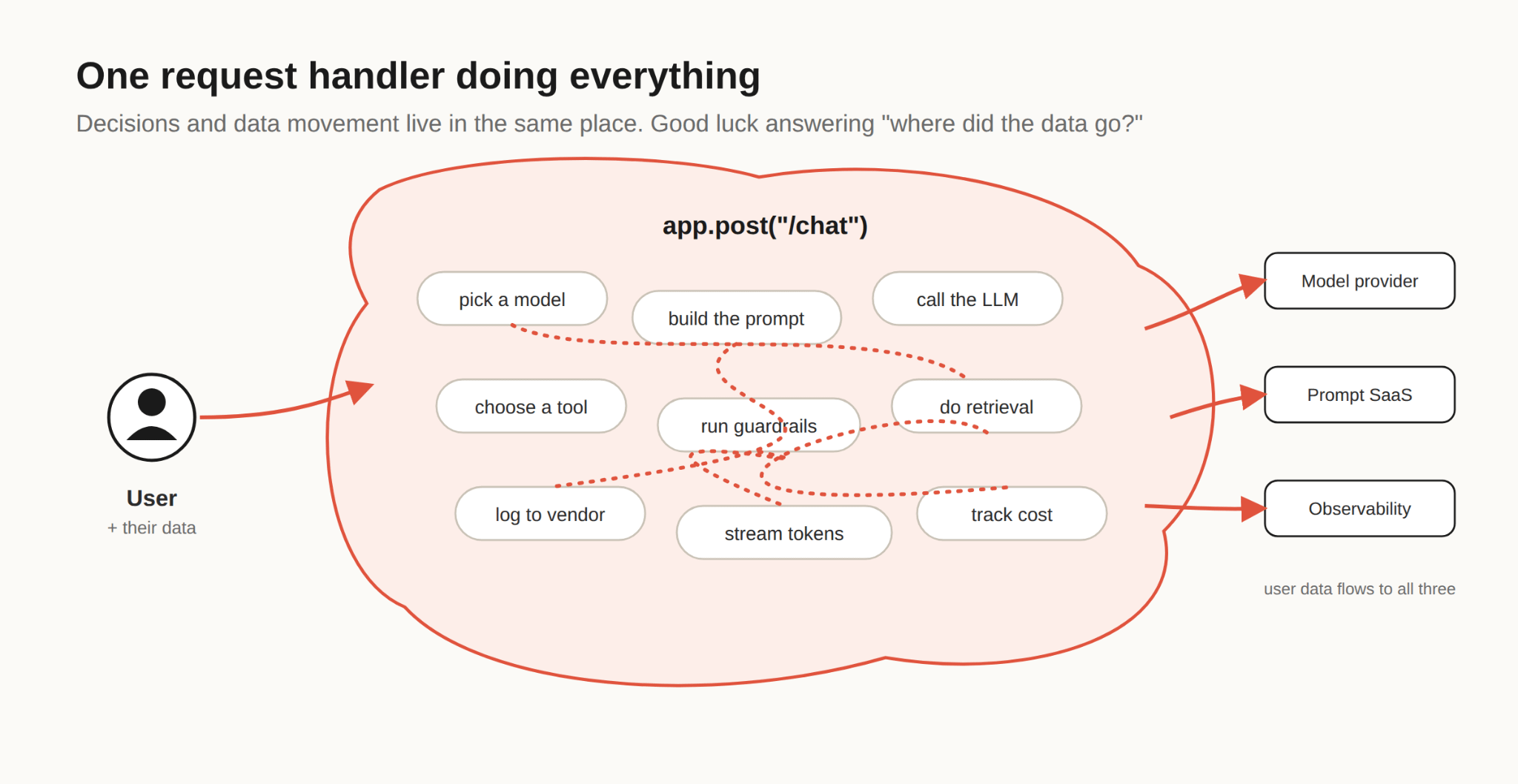
Figure 1: One handler doing everything, decisions and data movement are tangled together.
It works for a while, until it doesn’t. Here is where it starts to hurt:
1. You can’t answer “where did the data go?”
Because the prompt, the model keys, and the user’s documents all live in the same code path, the user’s data flows to every vendor in that path. It happened, because there was no line to stop it.
2. Every tiny change is a full deploy.
Want to A/B test a new system prompt? Swap a model? Turn off a tool that is misbehaving?
If those decisions live inside your handler code, you cannot change them without shipping code. A one-line prompt tweak becomes a pull request, a review, and then a deployment.
3. One hiccup takes the whole thing down.
Say your prompt-config service has a bad minute. In a blob design, your inference cannot run without it, so your AI feature goes dark, even though the model provider was up the entire time.
This should feel familiar if you read our earlier issue on service discovery. The same lesson applies here: a system that can’t survive one piece going wobbly is a system that will page you at 2 a.m.
Quick checkpoint before we fix it: if you cannot describe, in one sentence, which parts of your AI feature are “decisions” and which parts are “moving data,” you are probably in blob territory.
That is okay. Let’s draw the line.
Drawing the line
Kubernetes did this. Service meshes did this. Software-defined networking did this years ago. The decision-making layer is kept separate from the layer that carries traffic, so you can change one without disturbing the other. Here is the same idea for an AI app.
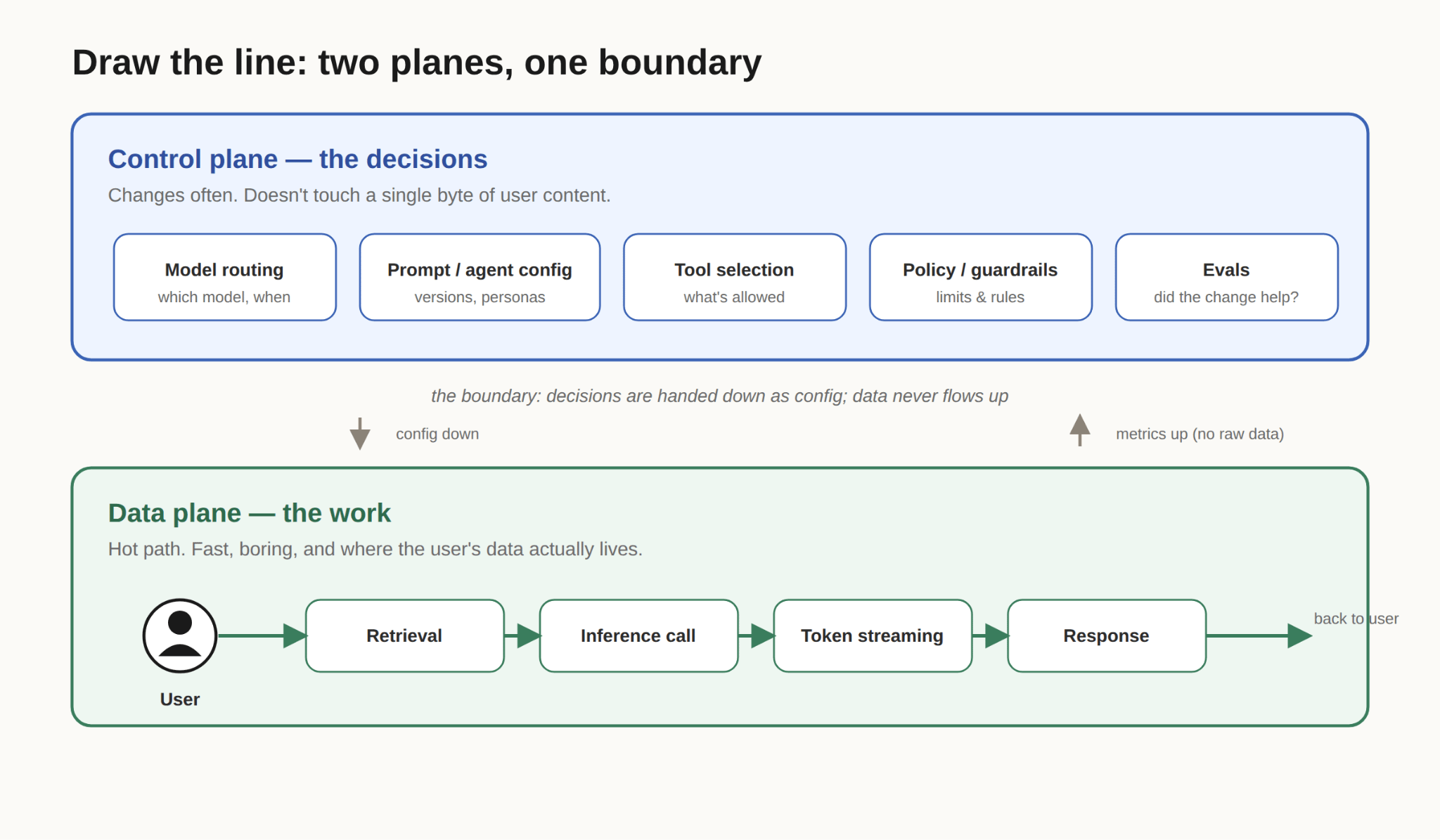
Figure 2: Two planes, one boundary. Decisions live on top and get handed down as config. User data lives at the bottom and never flows up.
The boundary is the important part, so let’s be understand about how it behaves:
Decisions flow down. The control plane hands the data plane a set of instructions: use this model, this prompt version, these allowed tools, these limits. It hands down config, not data.
Data does not flow up. The data plane can send metrics up (latency, token counts, “did the guardrail trip”) but not the raw user content. This one rule shrinks your privacy blast radius dramatically. Now the answer to “where does the data go?” is short: it stays in the data plane.
That is the whole design. Two boxes and a rule about which direction things are allowed to travel.
You can now change a prompt, add a model, or tighten a guardrail entirely in the control plane, without redeploying the thing that serves users. The good news is you do not have to build any of this from scratch. A lot of it already exists as off-the-shelf infrastructure, and the industry has quietly converged on the same two-plane language.
For the “which model, with what limits” decisions, that infrastructure is the LLM gateway. Tools like LiteLLM (open source, self-hosted), Portkey, Kong AI Gateway, and Cloudflare AI Gateway sit between your app and the model providers and handle routing, failover, caching, rate limits, and cost tracking, without you touching application code. Several of them describe themselves, in exactly these words, as a control plane for your AI traffic. Some even split their own product into a managed control plane and a data plane that runs inside your network, which is the whole idea, shipped.
For the “what is the prompt” decisions, the equivalent is a prompt registry: PromptLayer, Braintrust, LangWatch, or MLflow’s prompt registry, among others. Your app fetches the active prompt version at runtime, and prompt edits become an operational change instead of a code release.
Research says: keep the LLM out of the hot path
Here is where it gets interesting, and where a recent paper changed how I think about this. Most of us instinctively put the LLM in the data plane. It is the thing doing the work, so of course it goes on the request path, right?
A 2026 paper on Research Square, “LLM-driven control-data plane separation for zero-intrusion TCC transactions in legacy microservices,” argues for the opposite, and it is a genuinely clever inversion.
The authors put the LLM in the control plane, and they run it offline. In their design, the model reads the system’s API specifications and reasons about them once, ahead of time, to produce a set of plain, deterministic rules. Then the data plane is just a fast proxy that applies those rules on every request, no model call in the loop.
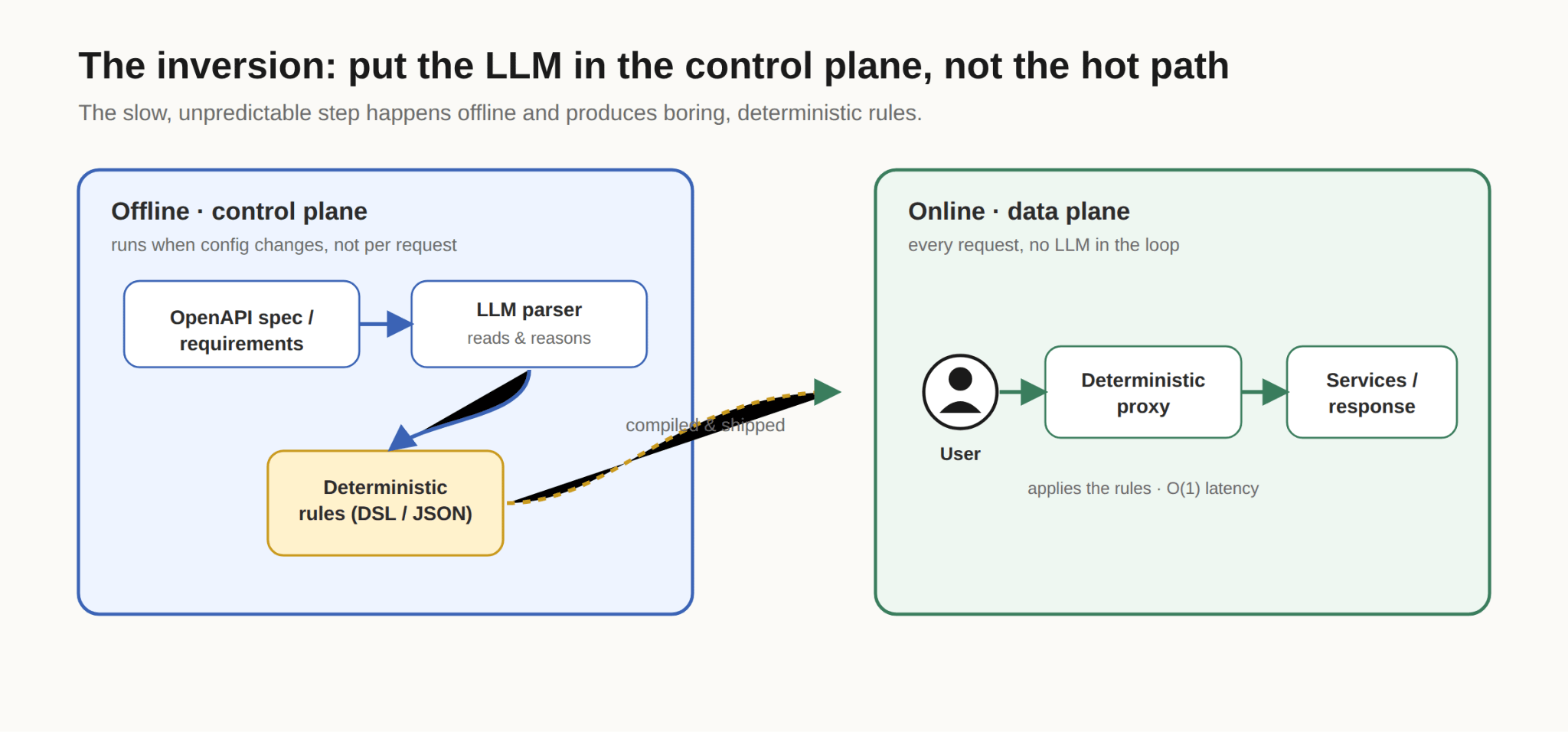
Figure 3: The LLM does the slow, smart thinking once, offline.
Why is this smart? Because it isolates the unpredictable part of your system from the part that has to be fast and reliable. The paper reports that keeping the model off the real-time path lets the online proxy run with constant, predictable latency, precisely because a generative model, which is nondeterministic by nature, never runs during a live request.
You do not have to adopt their exact setup to steal the lesson:
The nondeterministic thing belongs in the control plane. The hot path should be as predictable as you can make it.
Sometimes your product genuinely needs the model live in the data plane, a chat assistant, for example, has to call the model per turn. Put the model on the hot path only when the feature truly needs it, and keep everything you can (routing, config, guardrail rules, tool choices) up in the control plane where it is cheap to change and safe to reason about.
Make the boundary fail gracefully
One more design detail, because this is where real systems earn their keep. What happens when the control plane goes down?
If you designed the boundary well, the answer is: not much, for a while. The data plane should keep a cached copy of its last-known-good instructions and keep serving with them.
Think of it like the line cooks having tonight’s recipes printed and taped to the wall. If the head chef steps out, dinner service does not stop. The cooks keep making the dishes they already know. They just cannot get new recipes until the head cook is back.
So a control-plane outage should mean “we cannot change decisions right now,” not “the product is down.” That is a graceful degradation, and it is only possible because you separated the two planes in the first place.
What this does not fix
I want to be honest here, because separation is a design principle, not a magic.
It does not make your model correct - A clean data plane will still happily stream a confident, wrong answer. Separation controls where things run, not whether the output is any good. Your evals in the control plane are what catch that.
It adds a moving part - You now have a boundary to maintain, config to version, and a cache to keep fresh. For a prototype, a blob is genuinely fine, and most gateway guides say the same thing: skip the extra layer until you actually need it.
It does not draw the line for you - Some things sit awkwardly in the middle, and retrieval is the classic example. A useful rule of thumb: if changing something alters your app’s runtime behavior, routing, or decisions without needing a code change, it probably belongs in the control plane. If it is tightly bound to application logic, leave it in the code.
A stale cache can bite - If the data plane serves last-known-good config for too long during a control-plane outage, you might be running a prompt or a policy you meant to retire.
Where to get started
You do not need to re-architect anything on Friday afternoon. Try this instead:
Open your main AI handler and read it top to bottom. For each thing it does, write one word next to it: decision or data.
By the time you reach the bottom, you will see the tangle from Figure 1 and the line will almost draw itself. The first thing you pull out is usually the prompt or the model choice, because those are the ones you change most often and want out of your deploy pipeline first.
Quick summary
Control plane = decisions, data plane = work. Which model, which prompt, which tools, and your evals are decisions. Inference, retrieval, and streaming are work.
Make the boundary one-directional. Config flows down. Metrics can flow up. Raw user data never flows up.
Keep the nondeterministic thing off the hot path when you can. The research is a strong nudge here: let the LLM do slow, smart work offline and hand the live path boring, deterministic rules.
Design for graceful failure. A control-plane outage should mean “no new decisions,” not “product down.”
Start by labelling. Tag each line of your handler as a decision or data.
Separation of concerns is one of the oldest ideas in software, and AI apps did not escape it. The names are new, but the instinct is the same one you already trust everywhere else in your stack: keep the part that decides separate from the part that does.
Some resources that you can refer to:
Arize, Prompt templates as configs, not code (the config-vs-code rule of thumb)
Braintrust, What is prompt management? (why decoupling prompts from releases matters)
This Week in the News
💸 OpenAI Slashes GPT‑5.6 Prices, Adds Fast Mode
Luna is now 80% cheaper and Terra 20% cheaper, and Sol gets a new Fast mode running up to 2.5x faster at double the price, replacing Priority Processing. The number that actually matters: on Agents' Last Exam, Luna reportedly beats Fable 5 at nearly 99% lower cost per task. This is OpenAI betting that most agent workloads don't need frontier reasoning at every step. If you're still running multi-step pipelines on older models, this is worth a cost audit now.
🔧 Cloudflare Workers and Hyperdrive with SvelteKit: A solid walkthrough of wiring SvelteKit into Cloudflare Workers, including the “gotcha” that killed the author’s first deploy (drop wrangler types --check from your build script, it’s more trouble than it’s worth). The real value here is the Hyperdrive setup and per-request connection pattern via hooks.server.js, required reading if you’re putting a database behind Workers instead of a traditional long-lived server.
🧠 Kimi K3 Architecture Notes: Raschka’s rapid-fire breakdown of the now-largest open-weight model (2.8T params) is the fastest way to understand where LLM architecture is heading: LatentMoE, Kimi Delta Attention, and a full switch to NoPE with zero RoPE layers anywhere. Notably it’s the first frontier model to ditch positional embeddings entirely rather than mixing NoPE and RoPE, worth a skim even if you don’t care about the benchmarks.
✂️ The new rules of context engineering for Claude 5 generation models: Anthropic cut over 80% of Claude Code’s system prompt for newer models and shares why: rigid rules and repeated examples that used to compensate for weaker judgement now just constrain a model that’s gotten good enough to reason about tradeoffs itself. If your CLAUDE.md or agent prompts are still stuffed with defensive instructions “just in case,” this is a nudge to trim them back and lean on progressive disclosure instead.
🛡️ npm publish-time malware scanning and dual-use metadata: npm now scans every package before it’s installable, adding a ~5-15 minute publish delay, annoying if you have CI that assumes instant availability, but a genuinely good supply-chain move. The more interesting bit is the new contentPolicy/DISCLOSURE requirement for legitimate security tooling that looks malware-ish to scanners; if you maintain anything security-adjacent, go check whether you need to add this metadata before you get auto-blocked.
🪟 Dynamic API projections for Node.js: Microsoft’s new WinRT projection lets Electron/Node apps call native Windows APIs (on-device AI like Phi Silica, rich notifications, clipboard, sensors) straight from JS, no C++ addon or node-gyp required. It’s a genuinely clever “codegen from metadata” approach, though one commenter’s dig about Teams eating 1.5GB of RAM is a fair reminder that easier native access doesn’t fix Electron’s fundamental appetite.
Beyond the Headlines
▶️ The Creator of TypeScript Shows Off TypeScript 7: Anders Hejlsberg walks through the Go-ported, natively-compiled TypeScript 7 compiler, and the numbers are hard to ignore: Slack cut CI type-checking from 7.5 minutes to 1.25, Vanta saw up to 9x faster builds, and language-server crashes dropped over 60%. If you haven’t upgraded yet, this is the demo that’ll convince you to stop putting it off.
💸 How I Stopped Running out of Tokens: A refreshingly concrete rundown of tools and habits (rtk for compressing CLI output, Caveman for stripping filler from responses, auditing bloated CLAUDE.md files) that actually moved the needle on Claude Code spend. The CLAUDE.md audit story alone, converting always-loaded @ references into conditional ones, is worth stealing for any team drowning in context bloat.
⚙️ GitHub is the wrong shape for this new world: Depot’s CEO argues that PR-based, human-paced collaboration is now the actual bottleneck now that agents generate code at machine speed, and that we need to think of software delivery as infrastructure primitives (source control, execution, artifacts, identity, policy) rather than a better pull request. Self-serving coming from a CI vendor, sure, but the underlying question, who reviews and owns code when everyone in a company can generate it, is one every eng org is going to have to answer soon.
🧩 The Absolute State of Management: Alex Russell’s latest is a pointed jab at “state management” as a term that only exists because React made simple UI updates needlessly hard. Bracing if you’ve built your career on Redux/Zustand-style tooling, but a useful gut-check on how much complexity in modern frontend is self-inflicted rather than essential.
🛠️ TanStack is Doing What?: Tanner Linsley drops a “big change” for TanStack live with guests, no spoilers here, but given TanStack’s footprint across Query, Router, Start, and DB, whatever this is will likely ripple through a lot of stacks. Worth watching live rather than waiting for the recap thread.
🔍 How an AI Agent's Curiosity Cut Heap Size by 60%
A stray Ruby warning about redefining object_id, filtered out during a routine spec run, turned into a real find: opentelemetry-instrumentation-aws_sdk's use_all config was force loading all ~200 services in a legacy aws-sdk v2 gem just to instrument a handful. One patch dropped loaded services from 220 to 0, classes in the VM by 60%, and boot time by 36%. The lesson: pointing an agent at "diagnose this" for something adjacent to your task is cheap enough to do constantly now. Worth checking your own boot logs if you're on an old aws-sdk v2 pin with OTel enabled.
Developer Toolbox
🗺️ MapLibre GL JS Docs: The open-source, WebGL-based Mapbox alternative just shipped v6 as ESM-only, which means bundler setup now needs explicit worker-URL wiring (Vite’s ?worker&url, not plain ?url, the naive version silently breaks production builds). If you’re on Mapbox and dodging their license/pricing, or upgrading from MapLibre v5, the migration guide and per-bundler snippets here will save you a debugging session.
That’s all for this week. Have any ideas you want to see in the next article? Hit Reply!
Cheers!
Editor-in-chief,
Kinnari Chohan
👋 Advertise with us
Interested in sponsoring this newsletter and reaching a highly engaged audience of tech professionals? Simply reply to this email, and our team will get in touch with the next steps.
 | A guest post by
|