

WebDevPro #139: The Developer’s Edge in an AI-Assisted Workflow

Welcome to this week’s issue of WebDevPro! Today’s piece features insights from Mark Price, a Microsoft Certified Solutions Developer and former Microsoft Certified Trainer with more than 30 years of experience.
Mark is also a bestselling author of programming books across .NET, C#, Python, and modern web development,
Mark brings a practical, developer-first lens to building strong technical foundations. Today’s piece is drawn from his book Web Development with an AI Sidekick.

AI has changed the texture of web development work. A few years ago, most of us bounced between docs, Stack Overflow, GitHub issues, and half-finished notes in our own repos. Now, many developers open a chat window first. We ask for an explanation, a starter function, a refactor, a regex fix, or a quick way to debug a failing script. That shift is real, and it is already shaping how people learn and build.
Still, the real advantage does not come from generating code faster. It comes from using AI without giving away the thinking that makes you a stronger developer.
That matters most at the intermediate stage. Once you are past the basics, progress stops being about syntax recall alone. The actual challenge is understanding behavior, data flow, failure modes, and the trade-offs that sit behind everyday implementation choices. AI can support that process beautifully. It can also make it easier to skip it.
The difference comes down to one thing: your mental model.
Before we get into it, here’s a sneak peek of this week’s highlights:
JavaScript still lives or dies on behavior
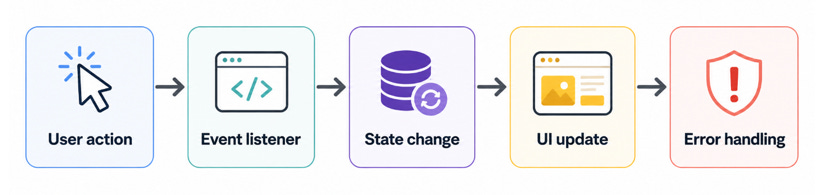
In frontend work, JavaScript remains the place where user behavior becomes actual application behavior. A click updates a count. A form input changes local state. A toggle shows hidden content. A validation rule decides whether something can be submitted. These are ordinary interactions, but they expose the central challenge of frontend development: the browser is always reacting to changing state.
That is why JavaScript becomes harder long before it becomes “advanced.” The difficulty usually is not the syntax. It is the chain of cause and effect. One event triggers a function. That function updates a variable. The UI reads that value and renders it. Another function depends on that same value later. At that point, you are no longer writing isolated lines of code. You are managing behavior.
const button = document.querySelector(’#save’);
const status = document.querySelector(’#status’);

button.addEventListener(’click’, async () => {
status.textContent = ‘Saving...’;

try {
await saveDraft();
status.textContent = ‘Saved successfully’;
} catch (error) {
status.textContent = ‘Something went wrong’;
console.error(error);
}
});
This is a small example, but it shows the real shape of frontend work. The question is not just “does it run?” The question is “what should the user see while something is happening, and what should happen when it fails?”
That is also where AI can be genuinely useful. I find it most helpful when it is asked to explain behavior, not just produce output. If you ask it, “Why might this click handler fail silently?” or “What edge cases should I think about here?” you get much better value than you do from “write this feature for me.”
The browser still rewards developers who can reason clearly about state, events, and side effects. AI helps, but it does not remove that requirement.
Debugging is still a first-class skill
One quiet risk with AI-generated code is that it can make clean-looking code feel trustworthy before it has earned that trust.
A function can look polished and still rely on DOM elements that do not exist. A promise can be written cleanly and still swallow an error. A generated solution can solve the visible symptom while leaving the original logic problem untouched. That is why debugging remains one of the most important skills in modern web work.
The console is still your friend. So are breakpoints, network inspection, and reading stack traces without panic. AI can help interpret an error, but the developer still needs to inspect the real runtime conditions.
const form = document.querySelector(’#signup-form’);

console.log(’Form found?’, !!form);

form?.addEventListener(’submit’, (event) => {
event.preventDefault();
console.log(’Form submitted’);
});
This snippet is simple, but it reflects a useful habit: check your assumptions in the environment where the code actually runs.
That habit matters more in AI-assisted workflows. If you paste an error into a chatbot before you inspect the actual state of the page, you risk outsourcing the wrong question. The better sequence is this: reproduce the issue, inspect the DOM or runtime values, form a hypothesis, then ask AI to help test or refine that hypothesis.
That turns AI into a debugging partner rather than a guess machine.
TypeScript makes fuzzy assumptions visible
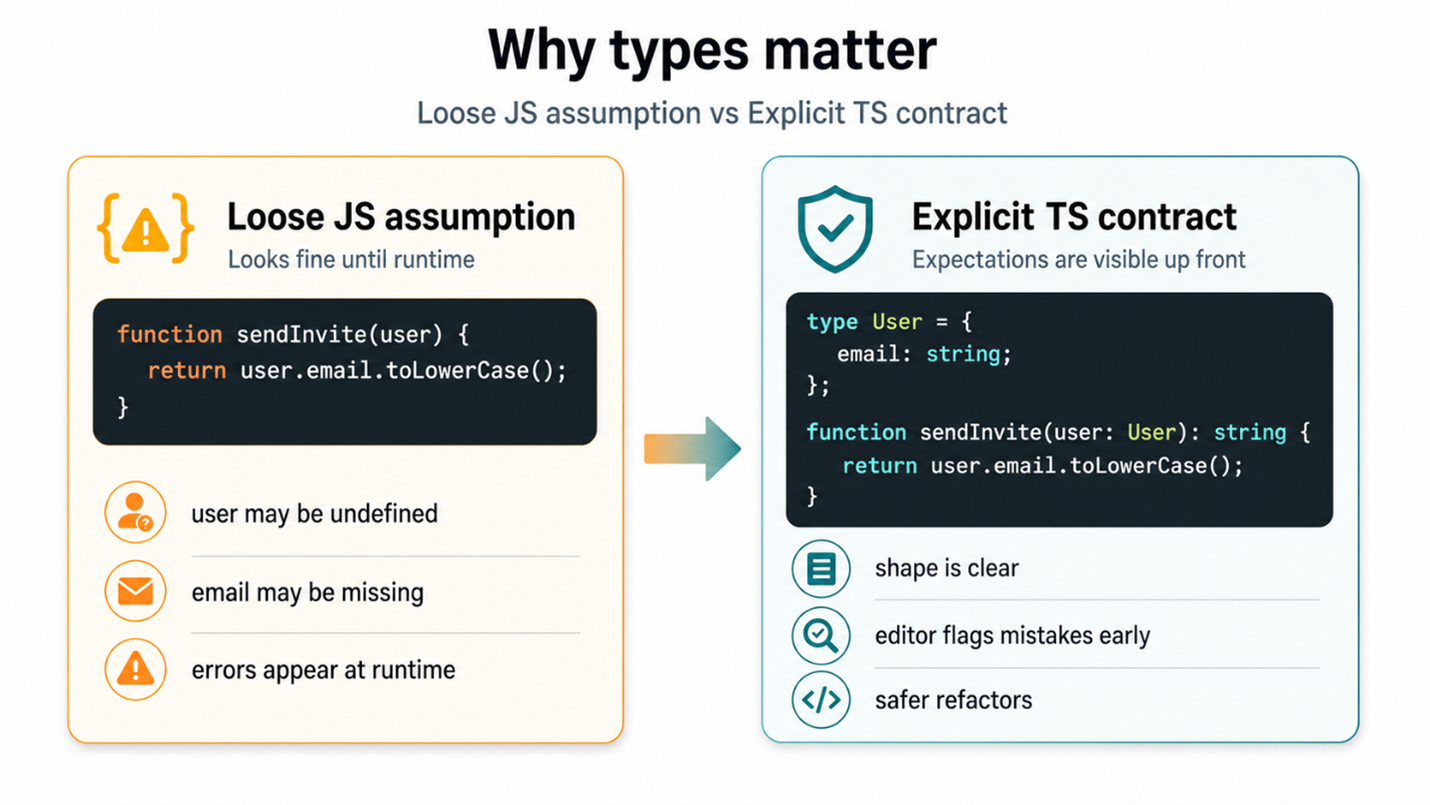
JavaScript gives you freedom. TypeScript pushes back when that freedom becomes vague.
That is why TypeScript matters even for developers who already “know JavaScript.” Its biggest benefit is not prestige or complexity. It is visibility. It reveals where your assumptions are too loose.
If a user may not have a profile image, the code should say so. If a function returns either success data or an error object, the code should say so. If a property can only be one of three allowed strings, the code should say so.
That sounds obvious, but teams often carry these assumptions informally. AI-generated code tends to make that worse because it often fills in the blanks with something plausible rather than something verified.
type SurveyStatus = ‘draft’ | ‘published’ | ‘closed’;

interface Survey {
id: number;
title: string;
status: SurveyStatus;
responseCount?: number;
}

function getStatusLabel(survey: Survey): string {
if (survey.status === ‘draft’) return ‘Work in progress’;
if (survey.status === ‘published’) return ‘Live now’;
return ‘No longer accepting responses’;
}
This is not flashy code, but it is valuable code. It makes the shape of the data easier to understand at a glance. It also gives your editor a chance to protect you from sloppy assumptions.
This is where AI becomes much more effective, too. When you prompt with clear data shapes, expected states, and explicit constraints, the quality of the generated response improves immediately. Good prompts in development often look a lot like good system design. They define what is allowed, what is optional, and what should happen when something is missing.
Developers sometimes treat TypeScript as overhead because the application seems small. The problem is that applications rarely stay small in the ways that matter. They grow in decisions, edge cases, and invisible dependencies. TypeScript helps bring those decisions into the open.
Backend work rewards structure earlier than people expect
On the backend, the same pattern appears in a different form. It is easy to write a Python script that works once. It is much harder to build backend logic that stays understandable after a few rounds of changes, debugging, and feature growth.
That is why the backend conversation should not just be about language choice or framework speed. It should be about structure. Small functions, sensible modules, meaningful variable names, clear error handling, and isolated responsibilities all matter much earlier than most people expect.
def calculate_completion_rate(total_responses, completed_responses):
if total_responses == 0:
return 0

return round((completed_responses / total_responses) * 100, 2)
A tiny function like this is not interesting because it is clever. It is useful because it is readable, testable, and easy to reuse. That is often the better way to judge backend code quality. Not “How compact is it?” but “Can I understand it six weeks later?”
AI can help a lot here. It can suggest cleaner names, extract a helper function, explain a traceback, or show a better way to handle a repeated block of logic. Still, the best outcomes come when you already know what kind of structure you want.
If you ask AI to “write backend code for analytics,” you may get something that works. If you ask it to “separate data access, business logic, and formatting concerns,” you are much more likely to get something maintainable. That difference matters.
Good AI usage looks more like collaboration than delegation
There is a lot of talk about prompt engineering, but for most working developers, the real skill is much simpler: knowing how to ask better technical questions.
Strong AI-assisted development usually includes some version of the following habits:
asking for an explanation before asking for a solution
requesting alternatives and trade-offs, not just one answer
giving the model the data shape, edge cases, and constraints up front
reviewing generated code line by line before accepting it
testing in the real environment, not just trusting a neat-looking response
Those habits keep you in the driver’s seat.
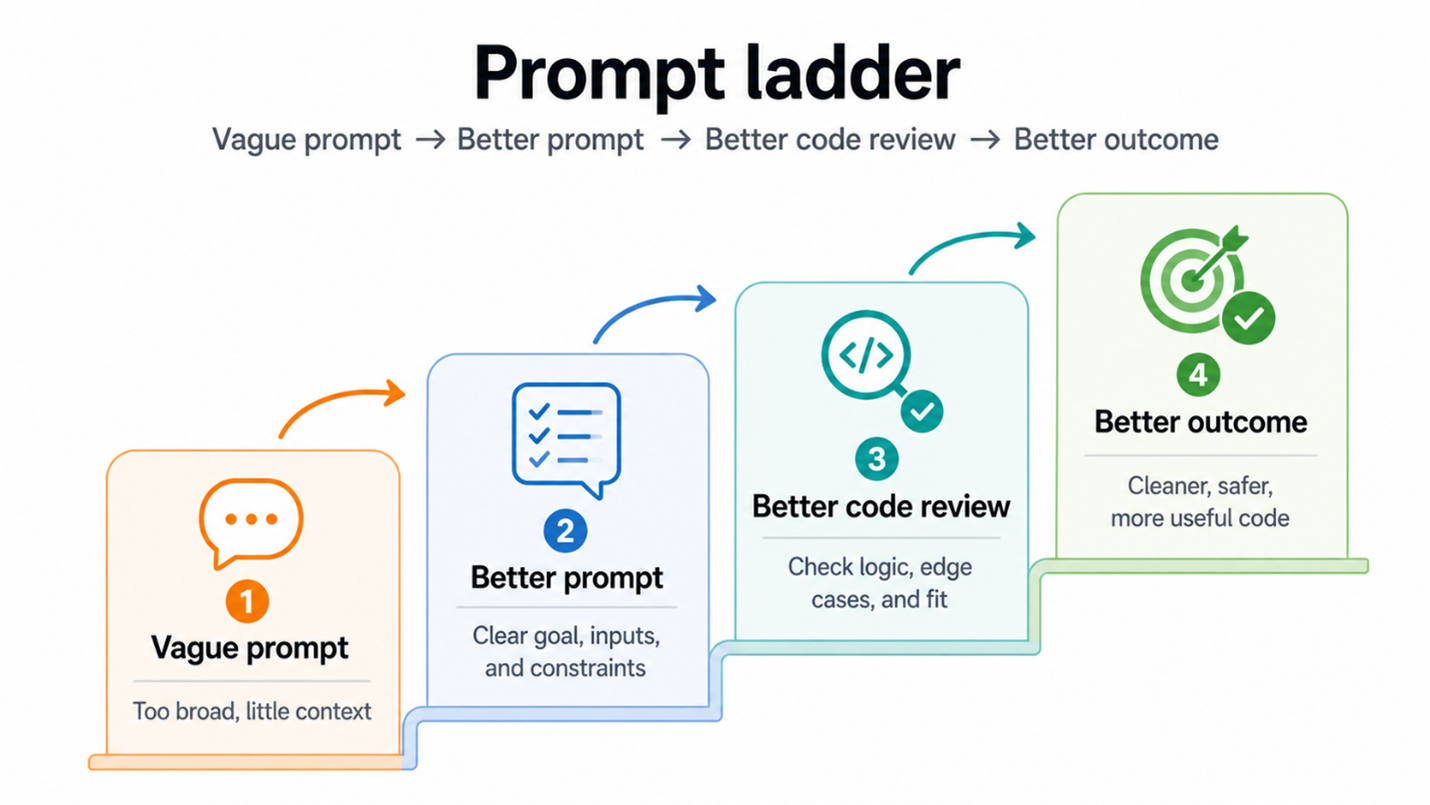
Bad prompt:
“Write a form validation function.“
Better prompt:
“Write a TypeScript function that validates a survey form.
Fields: title (required, min 5 chars), email (optional, valid format if present),
questions (must contain at least 1 item).
Return an object with field-specific error messages.“
The real pattern is bigger than any one language
What I find most interesting is that the same deeper ideas keep showing up across the stack.
In JavaScript, you are reasoning about user interaction and state changes. In TypeScript, you are making assumptions explicit so those changes stay manageable. In Python, you are organizing logic so that behavior can scale without becoming confusing. Different syntax, same underlying discipline.
That is why AI works best for developers who are trying to strengthen their mental model, not bypass it.
A developer with a clear mental model asks better questions:
What state is changing here?
What data shape does this function expect?
What happens when the input is missing or invalid?
Where should this responsibility live?
How should the system fail?
Is this solution easier to maintain than the last one?
Those questions improve your code even before AI answers them. Then AI becomes useful in the right way. It helps you refine, test, explore, and debug. It stops being a code vending machine and starts acting more like a second pair of eyes.
Takeaways
AI is now part of the everyday web development toolkit, and that is not changing. The developers who benefit most will not be the ones who hand over every task blindly. They will be the ones who use AI to sharpen their understanding of the stack.
JavaScript still demands a clear grasp of browser behavior. TypeScript still rewards developers who make assumptions explicit. Python still works best when logic is structured early and cleanly. Across all three, the strongest habit is the same: treat generated output as something to interrogate, not something to trust by default.
That is the mindset worth building.
AI can speed up the path to a solution. Your mental model determines whether the solution actually holds up.
If this way of thinking about AI-assisted development resonates with you, Web Dev with an AI Sidekick builds on the same idea in a more structured, practical way. You can pre-order the book on Amazon here: Web Dev with an AI Sidekick

Join Anna J McDougall, Field CTO at HashiCorp / IBM, for a live workshop on how engineering careers are evolving in the AI era.
📅 May 30 | Live Online Workshop
This Week in the News
🚀 Node.js 26 lands as the new Current release: Node.js 26 is here, with the Temporal API enabled by default, V8 14.6, and Undici 8. Developers also get new JavaScript capabilities such as Map.prototype.getOrInsert() and Iterator.concat(). This is the cutting-edge Current release until October, when Node.js 26 is expected to move to LTS. It is a good time to test compatibility, explore the runtime changes, and see what might affect production workflows later this year.
🌀 Remix 3 beta preview takes a sharper turn: Remix has had a long journey: it was created by the team behind React Router, positioned as an alternative to Next.js, acquired by Shopify, and later folded into React Router v7. Now Remix 3 is stepping out in a new direction: a full-stack, web standards-first framework with its own UI component model and no React at the center. It feels less like a version bump and more like a reset.
🧪A Bun experiment turns into a bigger debate: Jarred Sumner added a Zig to Rust porting guide to the Bun repo, and Hacker News quickly turned it into a much larger conversation about Bun’s future. The speculation got intense enough that Jarred stepped in and said the whole thread was an overreaction. It is a small reminder of how closely developers watch fast-moving tools. Even an experiment can look like a strategy shift when the project has this much attention.
🧭 VS Code 1.119 sharpens agent workflows: VS Code 1.119 focuses on smoother agent interactions, better observability, and fewer workflow interruptions. Agents can now request access to shared browser tabs, Copilot Chat sessions can emit OpenTelemetry traces, and sandboxed agents get more practical network and temporary-file permissions. It is another step toward making AI coding agents feel less separate from the editor.
Beyond the Headlines
🔐 Security through obscurity deserves a better conversation: This piece challenges the usual dismissal of “security through obscurity.” The argument is not that obscurity should replace strong security, but that it can still be useful as one extra layer. It is a thoughtful read for anyone who has seen good security advice turn into rigid slogans.
🥯 A developer worries about Bun’s future: This post looks at Bun with both admiration and concern. The runtime is fast, ambitious, and widely loved, but its future now carries bigger questions around ownership, priorities, and long-term stewardship. The piece is a developer asking what happens when a tool people rely on becomes part of a much larger company story.
🌐 Mozilla makes the case for trustworthy JavaScript: Mozilla explores how web apps can make their delivered JavaScript more trustworthy. The core concern is simple: users need a way to know that the code running in the browser is the code developers intended to ship. This matters most for high-trust apps, especially where privacy and encryption are involved. The open web needs stronger ways to make invisible tampering harder to hide.
🎥 A useful watch for your developer queue: I would keep this as a short watchlist item unless you want to share the title or main theme. Without that, the safest version is simple and curiosity-led. This video is worth saving for a slower watch, especially if you like technical talks that connect engineering decisions with the way developers actually build, debug, and maintain software.
⏱️Time to Yield revisits frontend responsiveness: This piece looks at yielding and responsiveness from a practical frontend angle. It is less about chasing benchmark wins and more about how JavaScript work affects the user’s experience. That framing is useful because performance is not only about speed. It is also about when work happens, how much room the browser gets, and whether the interface still feels alive under pressure.
Practical AI for Working Developers
AI is moving fast, and for a lot of developers, keeping up still feels like learning through trial and error.
BuildWithAI is Packt’s newsletter for engineers who want to move beyond AI headlines and start using it in real projects.
Backed by Packt’s 7,000+ tech books, courses, and expert resources across 1,000+ technologies, each issue brings you practical workflows, carefully chosen resources, and implementation guidance you can actually apply. Subscribe here.
Tool of the Week
Anime.js keeps web animation approachable ✨
Anime.js gives developers a polished way to build expressive motion on the web, from timelines and SVG animation to scroll-triggered effects and draggable interactions. It is useful when animation needs to feel intentional rather than decorative. The API stays approachable, but there is enough depth for teams building more crafted, interactive interfaces.
Crashcat makes physics demos surprisingly fun 🐱
Crashcat is a JavaScript 3D rigid body physics library for games, simulations, and interactive web experiences. It also has the kind of homepage you remember: a cat in a convertible driving through endless obstacles.
That playful first impression works. The examples make the library feel inviting before the technical details take over.
That’s all for this week. Have any ideas you want to see in the next article? Hit Reply!
Cheers!
Editor-in-chief,
Kinnari Chohan