

WebDevPro #142 Thinking in Transitions: The mental shift React 19 makes hard to ignore

Grow your Mac app with Setapp. Get around 30K unique impressions in the first days after your app’s release

Setapp makes sure your app isn’t just listed, but seen. Plus, we handle the stuff you don’t like: distribution, licensing, billing, taxes, and customer support. You build great software; we bring you revenue and valuable feedback to help your app grow. Hope is not a growth strategy. Join Setapp. Share your app!
Meet the author
This piece is written by Rodrigo Lobenwein.

With a background in full stack development across .NET and React, Rodrigo leads a team of senior developers and QA specialists, focusing on the architectural decisions that sit between engineering and product.
His work centers on helping teams develop the judgment to make the right technical calls not just follow the right frameworks.
React developers learn a reliable reflex early on: update state, let the component re-render, trust the output. That model still holds. The friction starts when the work behind a state update grows large enough for users to actually feel it: a search input that lags on every keystroke while thousands of rows refilter behind it, a tab change that completes instantly in the code but arrives just late enough to make the UI feel sluggish.
The instinct at that point is to reach for useMemo or useCallback. Those tools still matter, but they address unnecessary work. Sometimes the problem is different: React is being asked to treat urgent and non-urgent work as if they carry equal weight. Since version 18, the framework has had a better vocabulary for that distinction, and React 19 extends it further. Developing an intuition for when to apply it is what this piece is about.
Before we dig deeper into this, here’s a TL;DR you need:
📚 Storybook 10.4 brings improvements for component-driven development
🧩 Designing component architecture for React Server Components
🗺️ What clustering map tiles can teach us about problem solving
Not Every Update Has the Same Urgency
Consider a search screen. A user types a character into an input. Two things happen simultaneously: the text field shows the new value, and the results list re-renders against the new query.
Those updates are related but not equally pressing. The input sits directly under the user’s fingers — any delay there registers immediately as a broken experience. The results list matters too, but a brief lag is far less perceptible than a laggy cursor. Most users won’t notice 100ms of stale results. They will notice 100ms of input latency.
Instead of thinking only in terms of “state changed, render now,” concurrent React asks you to think about which update is urgent and which can wait for a better moment.
That distinction is the conceptual foundation of concurrent rendering.
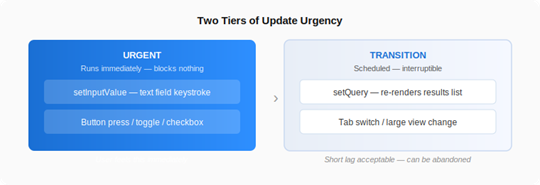
Figure 1 - The two tiers of update urgency in concurrent React
What Automatic Batching Actually Solved
Before transitions make sense, it helps to separate them from automatic batching, which is an adjacent improvement that solves a different problem.
In React 17, batching was largely confined to synchronous React event handlers. Multiple state updates inside a Promise callback, a setTimeout, or a fetch response were often processed as separate renders. More renders than necessary, without much upside.
The createRoot API in version 18 extended automatic batching across more update sources: timers, Promise handlers, and most async callbacks. Many apps shed redundant render cycles without changing a single component.
Batching is a reduction in render quantity. Transitions are about render priority. Even with batching in place, a single batched update that includes expensive list rendering can make an input feel sticky. Batching has no way to distinguish which part of that update the user is waiting on. Transitions provide that signal.
Marking Lower-Priority Work with startTransition
The startTransition API lets you label a state update as non-urgent. “Non-urgent” does not mean “unimportant” — it means React does not need to hold up higher-priority feedback to process it first.
In a search interface, the pattern looks like this:
const handleOnChange = (event) => {
setInputValue(event.target.value); // urgent: runs first
startTransition(() => {
setQuery(event.target.value); // deferred: can wait
});
};
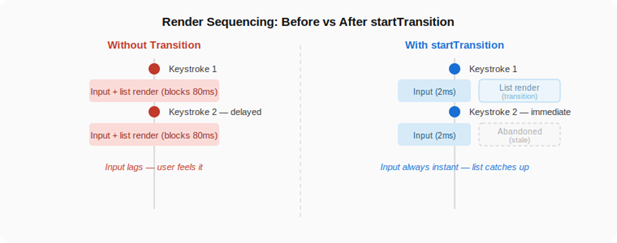
Figure 2 — Without transitions, an expensive list render blocks the input. With transitions, the input stays instant and list work is interruptible.
The transition wraps the update that causes the expensive rendering, not the expensive code itself. React is not being told to skip the work; it’s being given the context to sequence it correctly.
A reliable heuristic: reach for a transition when a state update can trigger a large render, and the user does not need to see the result of that update instantaneously. Filtering a long list is a candidate. Updating the visible value in an input is not.
When the UI needs to acknowledge that transition work is still in progress, useTransition returns both pieces:
const [isPending, startTransition] = useTransition();
Use isPending for lightweight signals: dimming stale content, showing a small spinner. Resist the urge to let it take over the layout, its value is in supporting the interaction, not replacing it.
When useDeferredValue Fits Better
Both startTransition and useDeferredValue address the same class of problem. The choice between them turns on where you have control in the component tree.
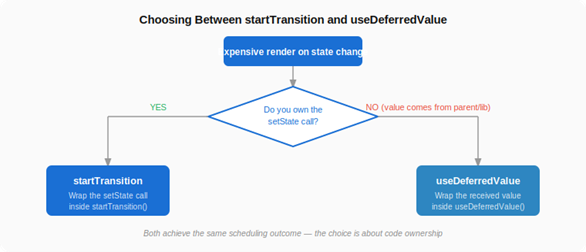
Figure 3 — The decision comes down to code ownership. Both APIs produce equivalent scheduling outcomes
When the component owns both the input and the expensive update, startTransition is usually the cleaner solution:
function SearchPage() {
const [inputValue, setInputValue] = useState(”“);
const [query, setQuery] = useState(”“);
const [isPending, startTransition] = useTransition();
const handleOnChange = (event) => {
const nextValue = event.target.value;
setInputValue(nextValue);
startTransition(() => { setQuery(nextValue); });
};
return (
<>
<input value={inputValue} onChange={handleOnChange} />
<Results query={query} dimmed={isPending} />
</>
);
}
The component has direct access to both setState calls, so it can be explicit about which one should yield.
When the value arrives from outside, from a parent, a form library, route state, or a shared component, the results component can’t reach the original setState. It can, however, choose to render against a deferred version of the value:
function ResultsPanel({ query }) {
const deferredQuery = useDeferredValue(query);
const isStale = query !== deferredQuery;
const items = useMemo(
() => filterLargeList(deferredQuery),
[deferredQuery]
);
return <Results items={items} dimmed={isStale} />;
}
Here, query updates immediately in the parent; deferredQuery trails behind when rendering is busy. The expensive filtering follows the deferred value, so the input stays responsive regardless of how long the results take.
How This Changes Component Design
Concurrent rendering does not mean every piece of state needs a priority label. Most updates are cheap, and most components need no transitions whatsoever.
The practical design question is more targeted: what part of this interaction must feel instant, and what part can follow slightly behind? Asking it tends to clarify both component boundaries and state placement. State driving the element the user is actively touching belongs on the urgent path. State driving a large subtree, expensive filtering, or a complex visual transformation is often a better fit for transition work.
One underrated benefit of this model is interruptibility. Transition rendering can be abandoned. If a user types another character before the previous results render finishes, React discards the stale render and restarts with the latest input. That’s a meaningful improvement over older setTimeout-based workarounds, where React had no clear signal about which work was still relevant.
The Shift Worth Internalizing
The APIs themselves are small. startTransition wraps a state update. useDeferredValue returns a lagging version of a value. The more durable change is in how you reason about responsiveness.
Older React code tends to treat rendering as a single block: state changes, render fires, UI reflects the result. Concurrent React asks for a slightly different mental model — one closer to how interface designers think about interaction. The thing under the user’s control responds first. Work that improves the screen but doesn’t need to be immediate follows behind.
React performance is not only about preventing work. It is also about sequencing work so the app feels responsive where it matters most.
Key Takeaways
React 18 expanded automatic batching via createRoot, cutting unnecessary renders across async update sources.
startTransition schedules a state update as lower priority without preventing it from running.
useTransition returns [isPending, startTransition], letting you give subtle in-progress feedback while expensive work continues.
useDeferredValue fits when a component receives a value from outside and can tolerate rendering against a slightly older version.
Transition rendering is interruptible — stale work is abandoned when newer, more urgent updates arrive.
The concurrent model reframes performance: not only as avoiding unnecessary work, but as sequencing necessary work by urgency.
Want to read more on the topic? React and React Native, Sixth Edition covers React 19 and React Native from the ground up.
🎁 GIVEAWAY — JUNE 2026
Build AI Products Faster with Cursor, Lovable & Windsurf
Subscribe to BuildWithAI and get our complete Vibe Coding with Cursor, Windsurf, and Lovable delivered free to your inbox.
Learn the exact workflows builders are using to:
✅ Turn ideas into working products in hours
✅ Build MVPs without getting stuck in code
✅ Use Cursor, Lovable & Windsurf effectively together
✅ Launch faster with AI-assisted development
This Week in the News
🤖 Google I/O 2026 pushes deeper into the agentic AI era: Google used I/O 2026 to double down on AI across its entire ecosystem, with major updates to Gemini, Search, developer tools, and agent-based workflows. The company introduced new models like Gemini Omni and Gemini 3.5 Flash, expanded its agent platform, and continued reshaping Search around AI-powered experiences. The bigger theme was clear: Google is moving beyond AI as a feature and positioning it as the foundation across products, workflows, and developer tooling.
📚 Storybook 10.4 brings improvements for component-driven development: Storybook 10.4 introduces a range of updates aimed at improving the developer experience around building, testing, and documenting UI components. The release continues Storybook’s focus on making component-driven development more efficient, with enhancements across workflows, tooling, and framework support. As frontend applications grow in complexity, tools like Storybook are becoming increasingly important for maintaining consistency and speeding up UI development.
🚀 Astro 6.4 goes full Rust on Markdown: Astro 6.4 joins the Rust rewrite club with Sätteri, a new Markdown processor that cut over a minute off real-world build times. It’s opt-in for now via the new
markdown.processorAPI, but the team has flagged it as the likely future default, migration cost being the remark/rehype plugin compatibility.🤖 Claude Opus 4.8 drops as an incremental but meaningful upgrade: Better benchmark scores, sharper agentic judgment, and notably improved honesty (4× less likely to let code flaws slip by unremarked). Pricing stays the same. Also shipping alongside it: effort controls on claude.ai, and a “dynamic workflows” feature in Claude Code that can spin up hundreds of parallel subagents for codebase-scale tasks.
🌐 Web platform catches up on quality-of-life: April’s Baseline digest brought some solid platform wins:
contrast-color()auto-picks readable text against any background,Math.sumPrecise()fixes floating-point drift in array sums, the<search>element now hands you an ARIA landmark for free, and ARIA attribute reflection means cleanerelement.ariaExpandedsyntax oversetAttribute.
Beyond the Headlines
⚡ How is Linear so fast? A technical breakdown: Linear has become the benchmark for fast, responsive web applications, and this deep dive explores the engineering decisions behind that experience. From frontend architecture to rendering strategies and performance optimizations, the article breaks down the techniques that help the product feel almost instantaneous. The broader lesson is that performance is rarely the result of a single breakthrough. It comes from dozens of deliberate decisions across the stack, all working together to reduce friction and keep users in flow.
🧩 Designing component architecture for React Server Components: React Server Components change more than just where code runs. They also influence how applications are structured and how responsibilities are divided between components. This article explores architectural patterns for organizing components in an RSC-based application and avoiding common pitfalls. As more frameworks embrace server-first rendering, understanding these patterns is becoming increasingly important. The challenge is no longer just building components, but deciding which ones belong on the server and which ones truly need to run on the client.
📄 Bringing AI workflows to PDF-heavy applications: As AI agents become more capable, one challenge remains consistent: documents. This article explores how Foxit’s MCP Server connects AI systems with PDF workflows, enabling tasks such as document analysis, extraction, and processing without requiring developers to build custom integrations from scratch. The bigger trend is the rise of infrastructure that helps AI agents interact with existing business systems. Rather than generating text in isolation, agents are increasingly being equipped to work with the documents and workflows that power day-to-day operations.
🚀 Migrating from Express to Next.js with AI agents: This case study explores using AI agents to help migrate an application from Express to Next.js. Rather than focusing solely on code generation, it examines how agents can assist with larger engineering tasks such as understanding existing architecture, planning migrations, and implementing changes across a codebase. The interesting takeaway is that AI is increasingly being used as a collaborator on complex development projects. The challenge is no longer whether AI can write code, but how effectively it can help developers navigate and transform existing systems.
🗺️ What clustering map tiles can teach us about problem solving: In this post, Cassidy Williams walks through the challenge of clustering map tiles and the thought process behind solving it. Rather than focusing solely on the final solution, the article highlights the experimentation, trade-offs, and iterative thinking that go into tackling a seemingly simple problem. It’s a good reminder that software engineering is often less about finding the perfect algorithm and more about breaking complex problems into manageable pieces and refining solutions along the way.
The Developer Toolbox
🔥 Build reactive web apps without a framework runtime: Modern frontend frameworks often trade simplicity for abstractions. Flue takes a different approach, offering a reactive UI framework that focuses on minimal overhead, direct DOM updates, and a lightweight development experience. The project aims to deliver fine-grained reactivity without the complexity or runtime costs typically associated with larger frameworks. If you’re interested in exploring alternative approaches to building fast, reactive web applications, Flue is worth a look.
⌨️ Handle keyboard shortcuts with minimal overhead: Keyboard shortcuts can quickly become messy as applications grow. Tinykeys is a lightweight JavaScript library that makes it easy to define and manage keyboard shortcuts with a simple, intuitive API. At under 1 KB, it supports complex key combinations and sequences without adding unnecessary weight to your application. If you’re building power-user features, command palettes, or productivity-focused interfaces, Tinykeys offers a clean way to handle keyboard interactions.
That’s all for this week. Have any ideas you want to see in the next article? Hit Reply!
Cheers!
Editor-in-chief,
Kinnari Chohan
👋 Advertise with us
Interested in sponsoring this newsletter and reaching a highly engaged audience of tech professionals? Simply reply to this email, and our team will get in touch with the next steps.